
Product review
eero 6+ Mesh Wi-Fi Review: Dual-Band Wi-Fi 6 for Homes (2026)
We may earn a commission when you buy through links on this page, at no extra cost to you. Affiliate disclosure
The eero 6+ suits multi-room homes on internet plans up to about 1 Gbps that want simple dual-band Wi-Fi 6 mesh with 2 Gigabit Ethernet ports per node. Skip it if you pay for multi-gig internet.
Who this helps: This review helps households decide whether the eero 6+ fits their home layout and internet plan. It is desk research from eero documentation, not a hands-on test, and coverage always depends on the building.
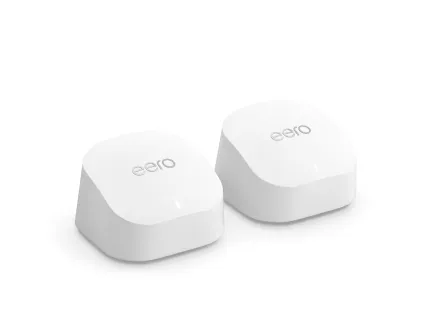
Product at a glance
eero 6+ Mesh Wi-Fi System
A dual-band Wi-Fi 6 mesh system for households on internet plans up to about 1 Gbps that want simple setup and two Ethernet ports on every node.
Verdict: who the eero 6+ is for
The eero 6+ is a good fit for households that want steady Wi-Fi across several rooms or floors on an internet plan up to about 1 Gbps, with an app-based setup. eero documents dual-band Wi-Fi 6, support for 160 MHz client connections and two Gigabit Ethernet ports on each node.
The 160 MHz support matters for newer phones and laptops, which can use the wider channel for faster local speeds. Older devices still connect, at their own lower speeds.
Homes on multi-gig internet plans should look at systems with faster Ethernet ports. The eero 6+ wired ports top out at 1 Gbps, which caps what you can get through a cable.
Verified specifications
eero lists the Wi-Fi standard, channel width support and Ethernet ports; it does not give a fixed coverage figure per node.
| Attribute | eero 6+ Mesh Wi-Fi System |
|---|---|
| Wi-Fi standard | Wi-Fi 6, dual band (2.4 GHz and 5 GHz) |
| Channel width | Supports 160 MHz clients |
| Ethernet | 2 x Gigabit Ethernet per node |
| Wired speed | Up to 1 Gbps |
| Coverage per node | Unknown: eero says coverage depends on the home |
Retailer listings quote coverage areas for packs of nodes. eero notes that walls, floors and building materials change real coverage, so plan by rooms rather than by a square-foot number.
Setup by home layout and Ethernet

Plan the number of nodes from your floor count and where Ethernet already runs, because wired links between nodes keep wireless capacity for your devices.
| Home layout | Suggested nodes | Ethernet note |
|---|---|---|
| Apartment or small single floor | 1 to 2 | A single node near the center may be enough |
| Two floors | 2 to 3 | One node per floor, wired if a cable runs between them |
| Long or L-shaped home | 3 | Place nodes in a line, about halfway between dead spots |
| Thick walls or a detached office | Add a wired node | Ethernet backhaul avoids losing speed through walls |
For two-story homes, follow our guide on how to place mesh Wi-Fi nodes in a two-story home. It shows where to put the first node and how to check signal between floors.
Ports, backhaul and speed limits
Two Gigabit Ethernet ports per node let you connect the modem on the first node and a TV, console or desktop on the others. When you wire nodes together, the cable carries traffic between them instead of the airwaves.
- Wired backhaul: run Ethernet from the main node to a second node where possible for the most stable speeds.
- Wired devices: use the spare port on each node for a desktop or streaming box that sits nearby.
- Speed ceiling: wired connections top out at 1 Gbps, which matters only on internet plans faster than that.
Check your internet plan speed before buying. If it is 1 Gbps or less, the eero 6+ ports are not the bottleneck.
Strengths and limitations
Strengths are simple Wi-Fi 6 mesh, 160 MHz client support and two Ethernet ports per node; limits are the 1 Gbps port speed and the lack of a published coverage figure.
- Strengths: dual-band Wi-Fi 6, 160 MHz support for newer devices, 2 Gigabit Ethernet ports on every node.
- Limitations: no multi-gig ports, and dual band means the same radios carry device traffic and wireless backhaul.
- Unknown from the documentation we checked: a per-node coverage area, which eero does not state as a fixed figure.
For most households on gigabit or slower plans, those limits rarely show up in daily use.
Alternatives to consider
Look at other mesh systems when your internet is faster than 1 Gbps, your home is large without Ethernet, or you need many wired devices.
- Multi-gig internet: a mesh system with 2.5 Gb Ethernet ports passes more of a fast plan through cables.
- Large homes without Ethernet: a tri-band system with a dedicated backhaul radio keeps more speed between nodes wirelessly.
- Many wired devices: add a small network switch to a node, or choose nodes with more ports.
- Newer standards: Wi-Fi 6E or Wi-Fi 7 systems add bands that newer devices can use.
Compare options on hardware revision, node count, wireless bands and port speed, the same criteria used in this review.
Before you buy: checklist
Run these checks before choosing the eero 6+.
- Your internet plan is 1 Gbps or slower.
- You counted floors and rooms to choose the number of nodes.
- You know where Ethernet already runs between rooms, if anywhere.
- Your main devices support Wi-Fi 6 to benefit from 160 MHz.
- Two Ethernet ports per node cover the wired devices you plan to connect.
FAQ
Is the eero 6+ Wi-Fi 6?
Yes. eero documents the 6+ as dual-band Wi-Fi 6, using 2.4 GHz and 5 GHz, with support for 160 MHz client connections. Older Wi-Fi devices still connect, at the speeds their own hardware supports.
How many Ethernet ports does each eero 6+ node have?
Each node has two Gigabit Ethernet ports. On the main node one port connects to your modem, leaving one for a wired device. On other nodes both ports are available, or one can carry a wired backhaul link.
How much area does one eero 6+ cover?
eero does not give a fixed coverage figure per node and says coverage depends on walls, floors and building materials. Plan by floors and rooms instead: one node per floor is a common starting point, then add nodes where signal drops.
Is the eero 6+ good for gigabit internet?
Its Ethernet ports support up to 1 Gbps, which matches gigabit plans. If you pay for multi-gig internet, a system with faster ports can deliver more of that speed to wired devices.
Should I use wired backhaul with the eero 6+?
Use Ethernet between nodes wherever a cable already runs. Wired backhaul frees the wireless radios for your devices and keeps speeds steadier across floors or thick walls. Where no cable exists, the nodes link wirelessly.
Sources
- eero: Mesh Wi-Fi product comparison — checked 2026-11-20
- eero: eero 6+ support — checked 2026-11-20
Ready to decide?
Check the current listing for the eero 6+ Mesh Wi-Fi System on Amazon.
View on Amazon